Hue AI email auto responder automates replies, improving support and efficiency. Try AI-powered email automation today!
Summarize with AI:ChatGPTPerplexityGoogle AIClaude
Updated November 2026. We refreshed this post to describe what Hue does with email in the LiveHelpNow help desk today and removed results figures and features we could not confirm.
Introduction to Hue AI
Businesses are turning to AI to improve customer service and communication. Hue is the AI assistant built into the LiveHelpNow help desk. It helps your team answer customer emails faster: it can reply to new tickets on its own from your knowledge, and it helps agents draft, improve and summarize their own replies. A person on your team is always one click away.
Email auto answer powered by Hue AI
Is your customer support team struggling to keep up with a flood of emails? Hue AI can help. Customer emails arrive in LiveHelpNow as tickets through email-to-ticket parsing. When a new ticket comes in, Hue can answer it on its own with a reply drawn from your knowledge base and past conversations. When Hue does not find the answer in your sources, it says it is not sure, and the ticket stays with your team.
How Hue works
Hue is built on leading AI models, which use natural language processing to read an email, work out what the customer is asking and write a reply. Hue writes that reply from your own content: your knowledge base, your website, your canned responses and past conversations.
Because Hue answers from your knowledge base, the best way to improve its replies is to improve your articles. When you publish or update an article, Hue uses the new version.
Importance of AI in Customer Service
AI is transforming customer service by reducing wait times and boosting satisfaction. It handles routine inquiries around the clock, allowing human agents to focus on complex issues.
AI also analyzes large data sets to reveal customer trends, helping businesses refine their services. This leads to better efficiency, cost savings, and a smarter approach to customer engagement.
How Hue AI Responds to Customer Emails
Hue works inside the LiveHelpNow help desk, so emails, tickets and replies stay in one place. Here is how to set it up.
Key features and setup
Choose Hue's knowledge sources
Hue writes its replies from the sources you choose:
- Company knowledge base: your FAQs, guides and documentation.
- Website content: public pages from your website domain, such as policies and pricing.
- Canned responses: the approved replies your team already uses.
- Previous interactions: past chat and ticket conversations for context.
Admins select the sources for each department in the Hue AI Sources settings.
Choose the sources Hue may draw on when it answers emails for your organization.
Then choose how Hue handles new tickets with the Hue AI Agent option in the ticket settings: replies for customers, or suggestions for agent review.
A person stays in charge
Hue does not replace your team. If Hue is not sure of the answer, or the customer needs more help, an agent picks up the ticket with the full history in front of them. Your ticket assignment rules and automations decide who that is, and a person is always one click away.
An example of a reply from Hue as the customer receives it, with the customer's question quoted below.
Efficiency
Hue helps your team by:
- Reducing routine typing: Hue drafts replies to common questions, so agents spend their time on complex cases.
- Keeping answers consistent: replies come from the same knowledge base your team maintains.
- Showing what is missing: when Hue is not sure, that is a sign the knowledge base needs a new or better article.
Built into the help desk
Hue is part of LiveHelpNow, so there is no separate tool to connect. Emails become tickets through email-to-ticket parsing, and Hue works on them there.
How Hue AI assists agents
Hue also helps agents who write their own replies. In the composer, an agent can ask Hue to draft a reply, improve a draft or summarize a long ticket. Hue reads the conversation and your knowledge base to suggest a response, and the agent can use, edit or discard it. A person decides what goes out.
A sensible way to start is with agent assist before turning on automatic replies. Your team sees how Hue reads questions, finds gaps in the knowledge base and builds trust in the answers. You can switch to automatic replies later if you want.
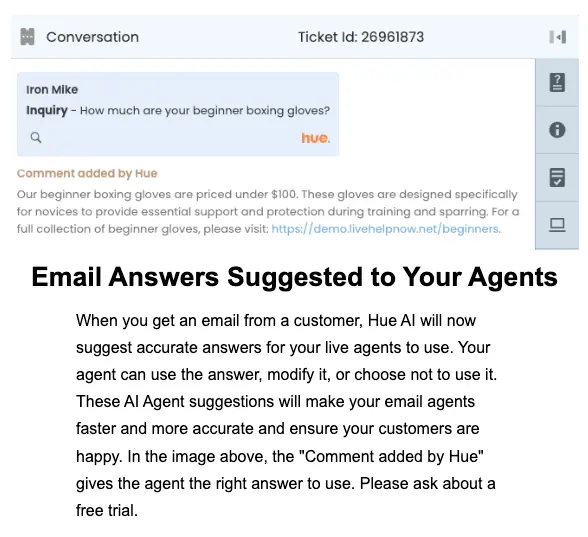
This is how Hue suggests an answer to an agent for a question a customer sent by email.
Understanding the question
Hue reads the whole email, not only keywords, so it can work out what the customer is asking even when the question is phrased loosely. It then looks for the answer in your sources. If the answer is not there, Hue says it is not sure and the ticket goes to an agent.
Working with your support email
Customer emails reach LiveHelpNow as tickets through email-to-ticket parsing, so every email is tracked as a ticket. Ticket categories, priorities, assignment rules and automations sort them, and Hue can answer new tickets on its own.
Increased Efficiency and Response Time
When Hue answers common questions on its own, agents spend less time typing the same answers and more time on issues that need a person. Faster first replies help customers feel heard.
Beyond email, LiveHelpNow AI also answers in live chat from your knowledge sources and hands the conversation to a person when needed.
Cost Savings for Businesses
Time saved on routine replies is time your team can spend on the cases that need judgment. Hue takes the repetitive first draft off their plate; it does not replace them.
Clear, quick answers also help keep customers. Use the calculator below to work out your customer retention rate.
Getting started
Hue is part of the LiveHelpNow help desk. Connect your knowledge base, start with agent assist, and turn on replies for new tickets when your team is comfortable. To see it on your own emails, book a demo.
Frequently asked questions
How does Hue AI answer customer emails?
Customer emails arrive in LiveHelpNow as tickets through email-to-ticket parsing. When a new ticket comes in, Hue can answer it on its own with a reply drawn from your knowledge base and past conversations. If Hue is not sure of the answer, it says so, and an agent on your team takes the ticket.
Where does Hue AI get its answers?
Admins choose the sources for each department in the Hue AI Sources settings: your knowledge base, canned responses, past chat and ticket conversations, and public pages from your website. When you publish or update a knowledge base article, Hue uses the new version in its replies.
What is the difference between Hue auto answer and Agent Assist?
With automatic answers on, Hue replies to new tickets on its own from your approved sources. Agent assist works in the composer: an agent can ask Hue to draft a reply, improve a draft or summarize a ticket, then use, edit or discard the result. Many teams start with agent assist, then turn on automatic answers.
Does Hue AI replace my support agents?
No. Hue answers routine questions on its own and helps agents write faster, but your team stays in charge. When Hue is not sure of an answer, or the customer needs more help, the ticket goes to an agent with the full history, and a person is always one click away.
Does Hue AI work outside email?
Yes. LiveHelpNow AI also answers in live chat from your knowledge sources and hands the conversation to a person when needed. Inside the help desk, agents can use Hue in the composer to draft, improve and summarize replies on any ticket.